 View on GitHub
 Main View Reference
Main View
ViewControllerMain
Controls transitions between domains by showing and hiding domain and indicator views. Also controls insulin entry fields.
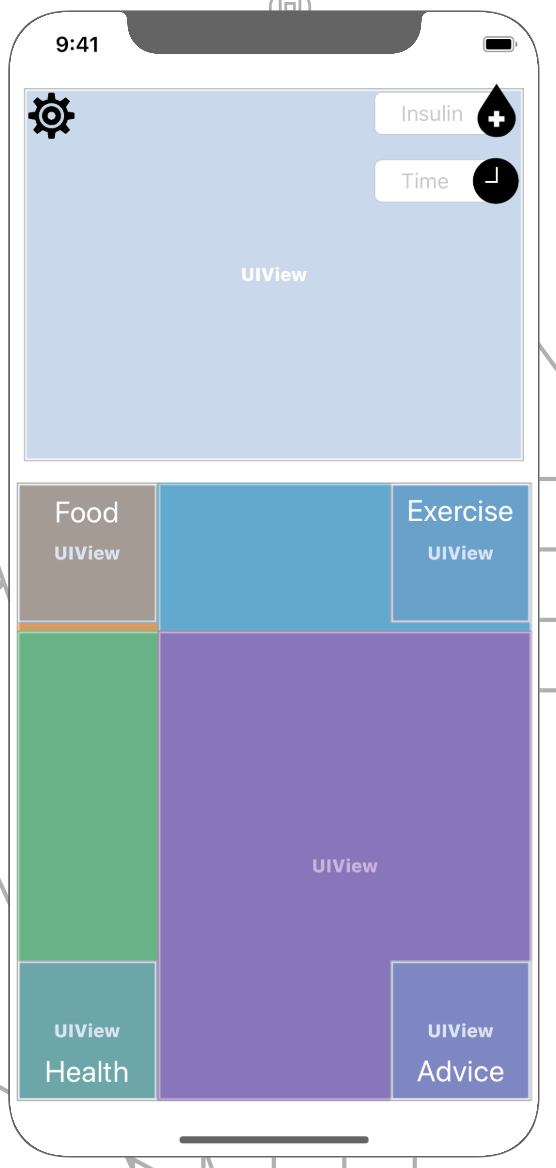
Main View Storyboard
Features
- Insulin data entry
- Layout constraints for all views
- Smooth transitioning between domain views
Insulin data entry
- Insulin entry button: Shaped like a drop of blood with a cross in it, clicking on it expands a field for entering a number of units of insulin. This is done with a numpad with a decimal point available for the user to use and accepts values of type
double. A clock icon also appears, allowing the user to optionally select a time that the insulin was entered, using a time picker. If unopened, the current time is used. When the insulin button is pressed again, the log is added to the database.
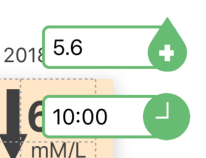
Image of Insulin entry fields when open
Transitioning between views
- Buttons to open views: A series of overlapping buttons and embedded container views, which are hidden and shown depending on the
MainViewStateallow the user to easily move between domains. When a domain is closed, its status indicator is visible, to provide important summary information. - Transitioning when keyboard is open: If a keyboard is open while transitioning between domains (only possible for food and exercise), this is tracked using observers and a delay is provided to create a smooth transition animation.
Layout
- Layout constraints: Set to ensure each status indicator is 100 x 100 px and each domain expands to fulfil the remaining space on all phone sizes.
Future Work
- Layout for horizontal view (currently disabled). Requires layout constraints for graph within container and making sure certain elements are not installed or constrained differently when viewed horizontally.